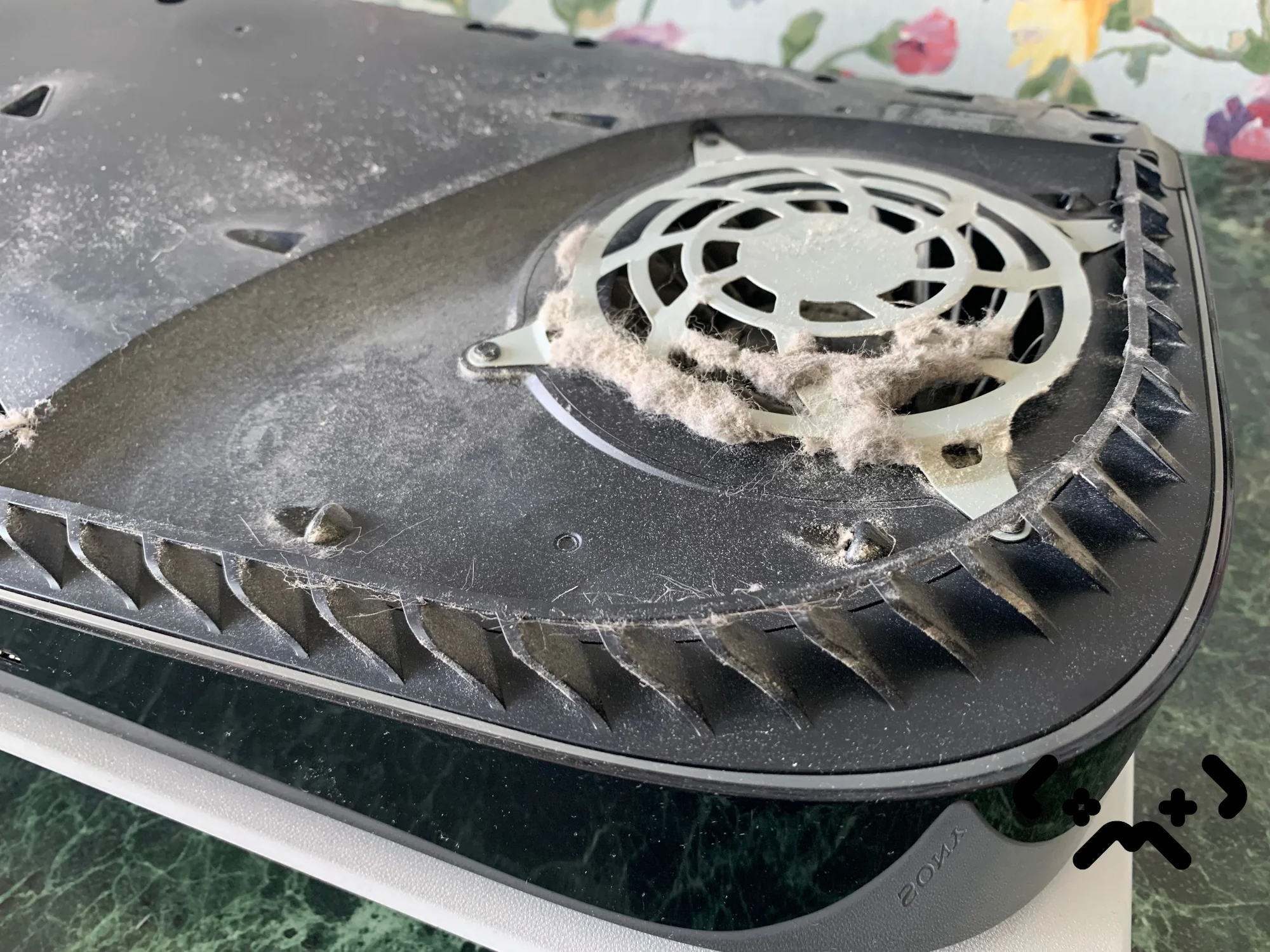
If your PS5 shuts down in the middle of a game, or you have seen the heat warning on screen and played on, the console is not broken yet. It is protecting itself: when the cooling can no longer carry the heat away, the PS5 cuts power before the main chip is damaged. The shutdown is the symptom. The cause is almost always airflow — dust, placement, or a worn heat path between the chip and the heatsink.
Below: what the shutdown means, the signs that come before it, why a PS5 starts overheating after a few years, what you can safely check at home, and what a proper clean involves. If the fan is loud but the console hasn't switched off yet, start with why a PS5 fan gets loud instead.
A PS5 that shuts itself off mid-game is its heat protection working, not a random fault. The usual warning signs are a fan that gets louder than it used to, then Sony's on-screen heat message. Sony's advice: give the console 10 cm on every side, keep it off long-pile rugs and out of cramped spaces, and vacuum the vents. If it still overheats after that, the dust is inside, past the covers, or the liquid metal no longer makes good contact — that needs a full clean.
PS5 running hot or shutting itself down? Full clean with fresh liquid metal from €89 — done at your home in Helsinki, Espoo or Vantaa, 90-day warranty.
Book a PS5 clean →What 'PS5 shuts down by itself' actually means
A PS5 that shuts down by itself during a game has usually reached its temperature limit, and the system has switched off to protect the hardware. It is a safety cut-out, built in on purpose — not the console failing on the spot.
Everything heavy in a PS5 happens on one AMD chip, the APU, which holds both the CPU and the graphics. Heat leaves it through a layer of liquid metal, a heatsink with copper heat pipes and aluminium fins, and a large 120 mm fan that draws in air from both sides. The fan speeds up as the chip and the board get warmer, and slows down again when they cool.
So what people call 'overheating' is the moment the fan is already running as hard as it can and the heat still isn't getting out. Something in that chain has stopped working well: air can't get in, air can't get through the heatsink, or heat can't get from the chip into the heatsink.
Warning signs before an overheating shutdown
A PS5 usually warns you before it overheats: the fan gets noticeably louder than it used to be in the same games, and then Sony's heat message appears on screen. A shutdown with no warning at all is less common and still points at the same cooling problem.
- —The fan gets louder over weeks or months. Louder in a demanding game is normal — Sony says so on its console noise page. Louder than it used to be in the same game, in the same room, is not.
- —The heat message: 'Your PS5 is too hot…'. Sony's own safety guide says that continued use while this message is showing may lead to the console becoming non-operational. Its instruction is to turn the console off, let it cool, move it somewhere well ventilated and check the vents aren't blocked.
- —The shutdown. The console switches off; unsaved progress is lost unless the game autosaved.
- —The next start. After an unplanned power-off the PS5 tells you it wasn't turned off properly. That message only says the shutdown wasn't clean — it doesn't tell you the cause.
If the console comes back on normally after cooling down, the protection did its job. If it now shuts down every session, or earlier each time, the cooling is getting worse and it won't fix itself.
Why your PS5 is overheating now
A PS5 that ran fine for years and now overheats usually has dust packed on the heatsink fins and fan, a placement problem, or liquid metal that no longer covers the chip well. Often it is more than one of these at once.
Dust is the common one. The fan pulls room air — and whatever is in it: lint, pet hair, fibres from the sofa — through the console. Part of it lands in the two dust catchers under the covers, which you can vacuum. The rest settles on the fan blades and on the front of the heatsink fins, deep inside, where a vacuum from the outside doesn't reach. Once the fins are matted, the fan can spin at full speed and still move too little air through them.
The heat path is the second one. Sony used liquid metal between the APU and the heatsink, held in place by a foam dam. Sony itself has written that using liquid metal in the original PS5 was 'quite challenging', and on the PS5 Pro it added fine grooves where the metal is applied so that the cooling effect is more stable. After years of heating up and cooling down, the dam ages, and liquid metal that has crept off part of the die leaves a spot where heat has a harder way out. No fan speed makes up for that.
| What you notice | What usually sits behind it |
|---|---|
| Louder fan over months, same games | Dust on the fan and heatsink fins — less air gets through |
| Heat message or shutdown soon after moving the console | Placement: cabinet, wall, rug, or something blocking the vents |
| Shutdowns even with clean vents and good placement | Dust inside past the covers, or liquid metal no longer covering the chip well |
| Grinding, rattling or clicking, not a rushing-air sound | A mechanical noise from the fan — cleaning the vents won't change it |
'My PS5 is on an open shelf — it can't be the airflow'
An open shelf helps, but it isn't a guarantee. Sony asks for at least 10 cm of free space on each side, no long-fibre carpet or rug under the console, and no narrow or cramped space. A shelf where the back of the console sits against a wall, or the console stands on a rug, still breaks those rules. And pet hair reaches an open shelf just as easily as a closed one.
Home checks — and what to leave alone
Two things are safe to do at home: fix the placement, and vacuum the dust under the covers the way Sony describes. Anything that needs a screwdriver inside the console — the fan, the heatsink, the liquid metal — is not a home job.
- —Turn the console off completely and unplug the power cable before you start.
- —Check the placement: 10 cm free on every side, not on a rug, not in a closed cabinet, nothing standing on it.
- —Remove the white covers. Sony's safety guide recommends taking them off and using a handheld vacuum on the dust trapped underneath; iFixit's step-by-step guide shows how the covers unclip and where the two dust catchers are.
- —Vacuum the dust catchers and the vents with a narrow nozzle on low power. Don't push dust further in with a brush or a blast of air.
- —Put the covers back and play the same game that used to trigger the shutdown.
If the problem was placement or loose dust in the catchers, that is often the end of it. If the console still overheats, the dust is on the heatsink fins or the heat path is the problem — and both sit under the metal shield, behind the fan, on top of the chip.
Liquid metal is not paste. It is a metal alloy that stays liquid at room temperature, it conducts electricity, and on the PS5 it is kept in place only by the foam dam around the chip. Lift the heatsink carelessly and it can end up on the board, where a single drop can short components. Getting to it also means taking the whole console apart. This is the part to leave to someone who does it routinely.
Repeated shutdowns: the cost of waiting
One or two overheating shutdowns are not a disaster — the console cut power precisely to avoid damage. A PS5 that keeps hitting its limit week after week is a different matter: nothing about the cause improves on its own, and the chip keeps going through the same cycle.
Every session that ends in a shutdown means the APU ran at the top of its temperature range until the protection stepped in. Repeated heating and cooling is the kind of stress that tires solder joints and other parts over time. Nobody can give you an honest number of shutdowns a console 'survives' — but the direction is clear, and Sony's own safety guide warns that playing on through the heat message may leave the console non-operational.
The practical point is money. A clean with fresh liquid metal is a fixed-price job. A PS5 that has stopped working after months of shutdowns is a much bigger problem, and a replacement main board costs several times as much as a clean. If the console still starts and still runs, it is at the cheap stage.
Inside a proper PS5 clean
A proper PS5 clean means taking the console fully apart, cleaning the heatsink and fan from the inside and replacing the liquid metal on the chip — not just vacuuming the outside. Anything less leaves the two real causes of overheating where they were.
- —Full disassembly: covers, shield, fan, main board out of the chassis, heatsink off the APU.
- —Dust removed from the heatsink fins, the fan and the air channels.
- —Old liquid metal removed from the chip and the heatsink.
- —Foam dam around the chip checked — replaced only if it is damaged.
- —Fresh liquid metal applied, heatsink refitted evenly.
- —Reassembly, then a long load test on the spot before the console is handed back.
We do this at your home or office in Helsinki, Espoo or Vantaa — travel is included — so the console never leaves the room. If you'd rather bring it to us, that works too. The clean with fresh liquid metal is from €89; with new thermal pads as well it is from €109. Diagnostics are free, and the work carries a 90-day warranty. If you're unsure how often a PS5 needs this, see how often a PS5 needs cleaning.
Book a PS5 clean at home: full teardown, dust out, fresh liquid metal, from €89. Free diagnostics, 90-day warranty.
Book a PS5 clean →FAQ
Why does my PS5 shut down by itself during games?+
Usually because it overheated: the fan could no longer move enough heat out and the console switched off to protect itself. Check the placement and vacuum the vents under the covers first. If it keeps happening, the cause is inside — dust on the heatsink or a worn liquid metal layer.
How do I tell overheating from a software problem?+
Overheating builds up: the fan gets louder, the heat message may appear, and the console switches off after it has been working hard for a while. A software fault looks different — the game closes with an error code instead of the whole console going dark. CE-108255-1, for example, is Sony's code for an error in a game or app, not a heat problem; the first fix is updating the game.
Can I replace the liquid metal myself?+
It is possible, but it is the riskiest job inside a PS5. It needs a full teardown, the old metal has to be removed completely, the dam has to be intact, and a stray drop of liquid metal on the board can short it. If you haven't done it before, a PS5 is not the place to learn.
Does the PS5 Pro overheat the same way?+
The Pro has the same basic design — liquid metal on the chip, heat pipes, a large fan and a dust catcher — with a bigger fan, more heat pipes and grooves that hold the liquid metal in place, according to Sony's Pro teardown. It still pulls dust in from the room, so the same checks apply.
My PS5 shut down and now won't turn on. What now?+
Let it cool, unplug it for a few minutes, then try the power button on the console itself. If it still doesn't start, go through what to check when a PS5 won't turn on before assuming the worst — many no-power cases are not caused by heat at all.
Certified laptop and console repair master. Twenty years on the bench in Helsinki — tearing down PS5s, MacBooks, and gaming PCs and writing down what we learn.
+358 45 196 9558 →