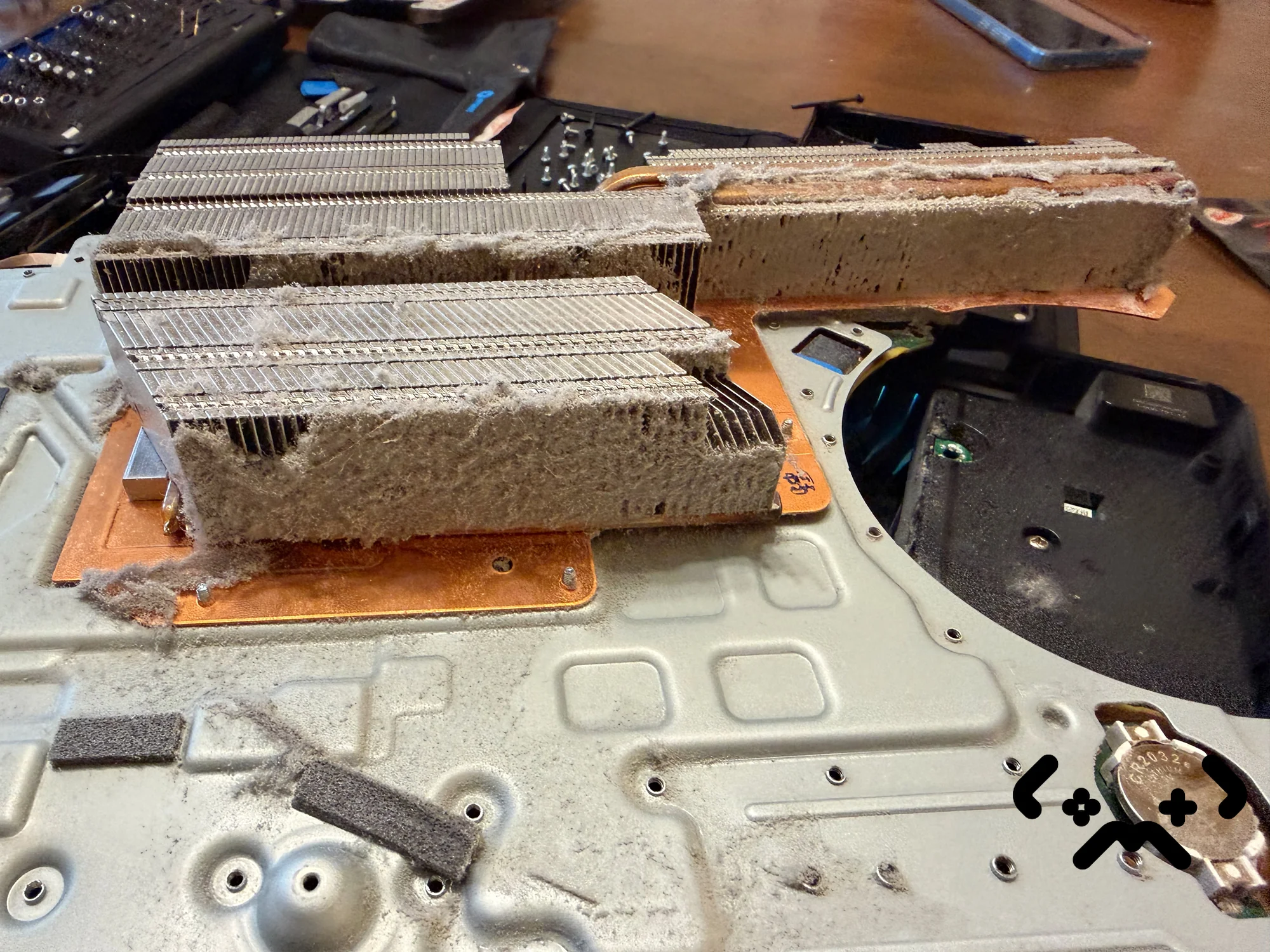
Some PS5 fan noise is by design. Sony's own support page says the cooling fan can run louder than usual in some games and apps, simply because it is spinning faster to cool the system. What isn't by design is a console that has got louder over the months — same game, same room. That is almost always airflow: dust in the fan and heatsink, a console squeezed into a cabinet, or both.
Below: why a PS5 fan gets loud, what Sony says you can safely clean at home, whether cooling stands and extra fans help, and when the fan needs a proper clean. If the console is already switching itself off mid-game, you are past the noise stage — read why a PS5 overheats and shuts down instead.
Louder in demanding games is normal — Sony says so. Louder than it used to be in the same game usually means dust or a bad spot. Give the console 10 cm on every side and keep it off long-pile rugs and out of closed cabinets. Sony's own safety guide says to take the covers off and vacuum the dust underneath — that part is a safe home job. The one serious independent test of add-on PS5 fans we could verify found they did nothing or made things worse.
Normal fan noise vs a fan with a problem
A PS5 fan that speeds up in a heavy game and settles down in the menu is working as designed. A fan that is loud from the moment a game loads, stays loud in the menu, or is louder than a year ago in the same game is telling you the cooling has less headroom than it used to.
The fan speed isn't a fixed setting. Sony's mechanical design lead Yasuhiro Otori explained at launch that the PS5 sets it from a temperature sensor inside the APU — the main chip — plus three more sensors on the main board (VGC, reporting Sony's 4Gamer interview). So the fan gets louder whenever something makes the chip or the board run warmer: a heavier game, a warmer room, or air that can no longer get through.
- —Louder only in certain games, quiet in the menu — normal behaviour.
- —Gradually louder over months in the same games — airflow is getting worse, and dust is the usual reason.
- —Loud, with the temperature warning on screen at some point — the cooling is at its limit. That is the overheating stage, not a noise problem any more.
- —Grinding, rattling or clicking instead of a rushing-air sound — that is a mechanical noise, not fan speed, and vacuuming won't change it.
Why the PS5 fan gets louder over time
A PS5 fan gets louder over time because the air path gets harder to push through. Dust settles on the fan blades and on the heatsink fins behind them, the same cooling needs more fan speed, and more speed means more noise.
The heatsink is the part that matters. Air from the fan has to pass between tightly packed metal fins to carry heat away from the APU. When lint mats the front of those fins, the fan has to spin faster to move the same heat. That dust sits inside the console, past the covers — vacuuming the outside vents only reaches part of it.
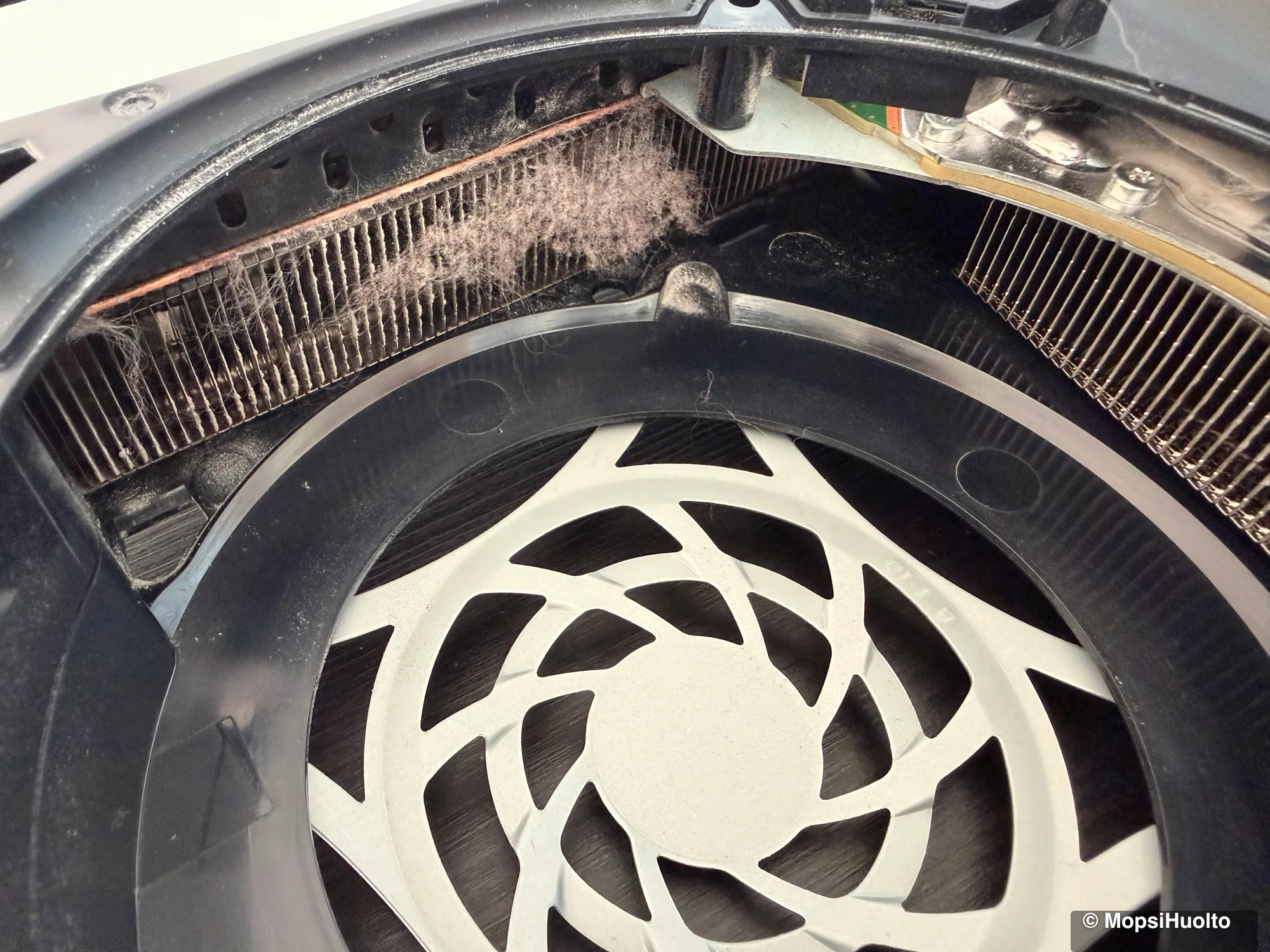
Two other things push the fan up with nothing wrong inside. Placement: a console in a closed TV unit or pressed against a wall breathes its own warm exhaust back in. And the game itself: some titles simply load the APU harder, and Sony says outright that the fan runs faster for them.
The last cause is the layer between the APU and the heatsink. The PS5 doesn't use ordinary thermal paste there — it uses liquid metal, and Sony's PS5 Pro teardown confirms the technology carried over to every later PS5 model. How that layer ages, and why a clean includes fresh liquid metal, is its own topic: see PS5 thermal paste replacement — it's liquid metal. None of it can be checked or fixed from the outside.
Placement: the free fix for a loud PS5
Placement costs nothing and is the first thing to check. Sony's PS5 console noise support page and its printed safety guide give the same rules:
- —At least 10 cm of free space on every side of the console.
- —Nothing blocking the vents on the sides and at the back.
- —Not on a carpet or rug with long fibres.
- —Not in a narrow or cramped space — a closed cabinet counts.
- —Not covered with a cloth.
The safety guide also says not to put objects on the console or stack it with other devices. That rules out the router, the soundbar or the controller parked on top. If the PS5 lives inside a TV unit, take it out for one evening and play the same game. If the fan is clearly quieter, you have found your cause.
PS5 fan cleaning at home: what Sony says is safe
The safe home clean is the one Sony documents: power off, unplug, take the covers off, and vacuum the vents and the dust catchers with a low-powered or handheld vacuum. You don't undo a single screw inside the console for this.
Sony's PS5 safety guide says to keep dust off the vents with a handheld vacuum, and recommends removing the covers and vacuuming the dust trapped underneath. Under the covers sit the dust catchers — collection points with holes you vacuum through. The Pro teardown notes the Pro has one on its top side 'just like in previous PS5 models'.
- —Turn the console fully off — not rest mode — and unplug the power cable from the back.
- —Remove the stand. On the original model the vertical stand screw comes out with a coin or a flat screwdriver.
- —Take the cover off following 'Remove and attach covers' in your model's manual — the method differs between the original, the Slim and the Pro.
- —Vacuum the vents and the dust catcher holes on low power with a narrow nozzle. iFixit's guide shows the two dust catchers on the original PS5.
- —Refit the cover, put the console back somewhere with clearance, and play the same game you heard the noise in.
Sony's guidance names a vacuum, not canned air. Blowing air into the vents moves loose dust further in rather than out, so if a can is all you have, leave it in the drawer.
What this won't reach: dust on the heatsink fins and the fan blades deep inside, and the liquid metal under the heatsink. Those sit behind internal shielding and aren't a home job.
Covers off, dust catchers clean, and the PS5 fan still loud? Full clean with fresh liquid metal from €89 in Helsinki — free diagnostics, 90-day warranty.
Book a PS5 clean →System software and fan behaviour
Keep the system software up to date — it is the only influence you have on fan control, and it is indirect. Sony said at launch that it would collect data on how the APU behaves in each game and optimise fan control through system software updates (same VGC report as above).
That is Sony's stated plan, not a switch you control. There is no fan-speed or temperature setting in the PS5 menus, and we couldn't find a Sony changelog that names a specific update as a fan fix. So update, because it costs nothing — but don't expect firmware to quiet a console full of dust.
Cooling stands and extra fans: do they help?
Probably not — and the one serious test we could find says no. Clip-on fans for the back of the PS5 and cooling bases with built-in fans are sold everywhere. Sony's own placement and cleaning guidance doesn't mention them at all.
Gamers Nexus, a channel known for controlled thermal and noise testing of PC hardware, bought several of these accessories for the original PS5 and tested them in February 2021. The verdict is in the title: Basically A Scam: PS5 Aftermarket Cooling Fans Blow the Wrong Way. In their own summary, the fans and cooling bases 'literally do nothing, and even worse, they make the performance worse'.
The evidence is thin, and we would rather say so. That is one test, of specific products, on the launch model, several years ago. We couldn't find an equally careful independent test of stands made for the Slim or the Pro. Plenty of shopping sites publish 'tested' rankings of cooling stands, but we couldn't check their methods, so we don't cite them.
| Option | What the evidence says | Our read |
|---|---|---|
| Moving the console out of a cabinet, 10 cm clearance | Sony's own guidance | Do this first |
| Covers off, vacuum the dust catchers | Sony's own guidance | Safe at home, do it |
| Plain stand with no fan | Holds the console, does nothing for cooling | Fine if the vents stay clear |
| Clip-on exhaust fan | Gamers Nexus 2021: no gain or worse | Skip it |
| Cooling base with fans | Gamers Nexus 2021: no gain or worse | Skip it |
The logic holds even without more tests. An add-on fan can't reach the dust on the heatsink fins, and it can't touch the liquid metal under the heatsink. If the noise comes from either, the accessory works on the outside of a problem that is on the inside.
When the fan needs a proper clean
If the console has clearance, the covers and dust catchers are clean, and the fan is still louder than it used to be in the same game, the dust is inside — on the fan and the heatsink fins, where only opening the console reaches it. That is what a full PS5 clean is for.
MopsiHuolto does the PS5 clean on-site, at your home or office in Helsinki, Espoo or Vantaa: the console is opened, the fan and heatsink are cleaned, and the APU gets fresh liquid metal. Diagnostics are free and the work carries a 90-day warranty. For how often a PS5 needs this, see why a PS5 needs cleaning once a year.
Loud PS5 fan, clean covers, still no change? Fixed price from €89 — fan and heatsink cleaned, fresh liquid metal, 90-day warranty.
Book a PS5 clean →FAQ
Why is my PS5 fan so loud?+
Because it is working harder to move air: dust on the fan and heatsink, a cramped spot, or a demanding game. Louder in heavy games is normal. Louder than it used to be in the same game is not — start with placement, then the covers and dust catchers.
How do I clean my PS5 fan without opening it?+
Unplug the console, take the covers off and vacuum the vents and the dust catchers with a low-powered vacuum, as Sony's safety guide describes. That clears the dust near the vents. It doesn't reach the heatsink fins or the fan blades deep inside.
Do PS5 cooling fans and stands work?+
The only rigorous independent test we could verify — Gamers Nexus, 2021 — found clip-on fans and cooling bases for the original PS5 did nothing or made things worse. We found no careful tests for Slim or Pro stands. Clearance and a clean console do more.
Is it normal for the PS5 fan to be loud in some games?+
Yes. Sony's support page says the fan can run louder than usual in some games and apps because it is cooling the system harder. It is only a warning sign when the same game gets louder over time.
Is it safe to vacuum a PS5?+
Yes — unplugged, with a low-powered or handheld vacuum. That is Sony's own recommendation for the vents and for the dust under the covers. Don't go further into the console than the covers.
Certified laptop and console repair master. Twenty years on the bench in Helsinki — tearing down PS5s, MacBooks, and gaming PCs and writing down what we learn.
+358 45 196 9558 →