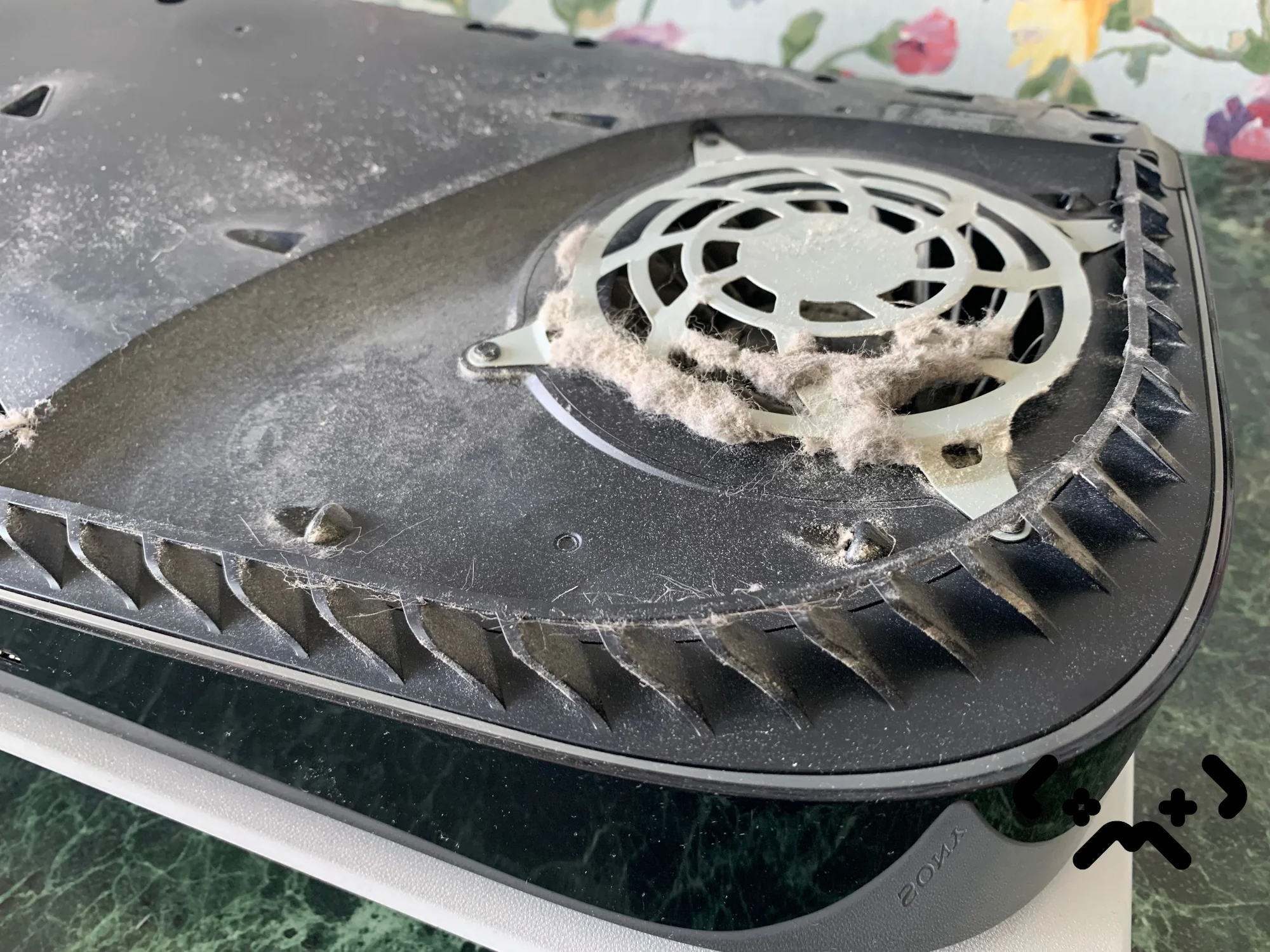
There is no fixed interval for cleaning a PS5. A console on an open desk in a smoke-free room with no pets can run for years without trouble; one on a rug next to a long-haired dog can clog much sooner. What matters is what the fan pulls in from your room — and the signs the console gives you when it has had enough.
Below: what builds up inside a PS5, what it does, how to tell when yours is due, what Sony says you can clean yourself, and what a full clean involves. If your console is already shutting itself down mid-game, go straight to why a PS5 overheats and shuts down.
No calendar rule fits every home — pets, carpet, smoke and placement decide how fast a PS5 fills with dust. Vacuum the vents and the dust catchers under the covers whenever you see dust; Sony recommends exactly that. A fan that is louder than it used to be in the same game, or the heat warning on screen, means the dust is now deeper than a vacuum reaches. A full clean takes the console apart, cleans the heatsink and fan and replaces the liquid metal on the chip.
PS5 clean with fresh liquid metal from €89 — done at your home in Helsinki, Espoo or Vantaa, 90-day warranty.
Book a PS5 clean →What builds up inside a PS5
Everything in the air of your room ends up in a PS5 sooner or later: dust, lint, pet hair, fibres from textiles, and in a smoking household the smoke residue that binds them together. The console has no replaceable filter — only two dust catchers under the covers, which hold part of it.
Air enters at the front and leaves at the back. Inside, a large 120 mm fan draws in air from both sides and pushes it through the heatsink, which carries heat away from the main chip through heat pipes and a stack of thin aluminium fins. Every place the air changes direction or squeezes through a gap collects dust.
- —Dust catchers under the white covers — designed to be vacuumed by the owner.
- —Fan blades — dust sticks to the leading edges and the fan needs more speed for the same airflow.
- —Heatsink fins — the narrowest gaps in the air path; once lint mats the front of them, airflow drops fast.
- —Vents and air channels — the first place you can see dust, and the easiest to clean.
Sony's own safety guide tells owners not to keep the console in areas with high dust or cigarette smoke, not to put it on long-fibre rugs, and not to let dust build up on the vents. Those three lines describe the homes where a PS5 fills up fastest.
Symptoms: what dust actually does
Dust makes the PS5 cooling work harder for the same result. The fan spins faster and gets louder, the console runs closer to its temperature limit, and eventually it shows a heat warning or switches itself off.
| What you notice | What is usually behind it |
|---|---|
| Fan louder than it used to be in the same game | Dust on the fan blades and heatsink fins — less air gets through |
| Heat warning on screen | The cooling is at its limit: blocked vents, poor placement, or dust inside |
| Shutdown mid-game, 'not turned off properly' on the next start | The heat protection cut the power |
| Still hot after vents and placement are fixed | Dust deeper inside, or liquid metal no longer covering the chip well |
| Grinding or rattling rather than rushing air | A mechanical noise from the fan — vacuuming won't change it |
Louder in a demanding game is normal, and Sony says so on its console noise page. The warning sign is change: louder than last year, in the same game, in the same room. For more on noise alone, see why a PS5 fan gets loud.
Dust and the liquid metal
Between the chip and the heatsink Sony used liquid metal, kept in place by a thin foam dam. Dust doesn't reach it — it is sealed under the heatsink — but heat does. Sony has written that liquid metal in the original PS5 was 'quite challenging', and on the PS5 Pro it added fine grooves so that the cooling effect is more stable. After years of heating up and cooling down the dam ages, and on a worn dam the liquid metal can creep off part of the die. A console that runs hot on dusty fins speeds that up, which is one more reason not to let the dust sit.
How often a PS5 needs cleaning
Clean the outside whenever you see dust on the vents, and have the inside cleaned when the console starts giving signs — not on a fixed date. The room decides the pace, not the calendar.
- —Pets, especially long-haired ones — hair goes straight into the air path.
- —Carpets and rugs, and a console standing on or near one.
- —Smoking indoors — Sony names cigarette smoke as a place not to keep the console.
- —Placement — a closed TV cabinet, a shelf pressed against a wall, or something standing on the console.
- —Renovation dust in the flat or the building.
- —Hours of play — the more the fan runs, the more air it moves through the console.
If several of these apply, check the dust catchers more often and expect to need a full clean sooner. If none do, a PS5 can go a long time without one. Either way, the signs above tell you more than any schedule: a fan that is louder than it was, a heat warning, or a shutdown.
The fan is louder than it used to be in the same game. The fan is loud even in the menu. The heat warning has appeared, even once. The console has switched itself off mid-game. Any one of these means the dust is past the covers or the heat path needs attention.
Between cleans: what you can do at home
You can safely vacuum the vents and the dust under the white covers yourself — Sony recommends it. Everything behind the covers that needs a screwdriver is a different job.
- —Turn the console off completely and unplug the power cable.
- —Leave at least 10 cm free on every side, keep it off long-fibre rugs and out of cramped spaces — Sony's own placement rules.
- —Remove the white covers. iFixit's guide shows how they unclip and where the two dust catchers are.
- —Vacuum the dust catchers and vents with a narrow nozzle on low power, as Sony's safety guide describes.
- —Don't blow dust further in with a brush or a blast of air — it ends up on the heatsink fins, where you can't reach it.
This keeps the easy part of the air path clear and costs nothing. It does not reach the heatsink fins deep inside or the liquid metal on the chip.
Inside a full clean, step by step
A full PS5 clean means taking the console apart, cleaning the heatsink and fan from the inside and replacing the liquid metal on the chip. It is the only way to reach the dust that a vacuum from the outside can't.
- —Full disassembly: covers, shield, fan, main board out of the chassis, heatsink off the chip.
- —Dust removed from the heatsink fins, the fan and the air channels.
- —Old liquid metal removed from the chip and the heatsink.
- —Foam dam around the chip checked — replaced only if it is damaged.
- —Fresh liquid metal applied, heatsink refitted evenly.
- —Reassembly, then a long load test on the spot before handover.
We do the whole job at your home or office in Helsinki, Espoo or Vantaa — travel is included, and you don't have to take the console anywhere. If you'd rather bring it to us, that is fine too. The clean with fresh liquid metal is from €89; with new thermal pads as well it is from €109. Diagnostics are free and the work has a 90-day warranty.
Getting to the heatsink means taking the whole console apart, and the liquid metal under it is an electrically conductive alloy held in place only by the foam dam. A drop in the wrong place on the board can short components. The covers and dust catchers are an owner's job; the inside is not a first-time project.
Book a full PS5 clean at home — dust out, fresh liquid metal, from €89. Free diagnostics, 90-day warranty.
Book a PS5 clean →FAQ
Does a PS5 need cleaning every year?+
Not by the calendar. A PS5 in a dusty home with pets may need a full clean well within a few years; one in a clean room with no pets can go much longer. Vacuum the covers and vents when you see dust, and book a full clean when the fan gets louder than it used to be or the heat warning appears.
Will opening the PS5 void Sony's guarantee?+
Taking off the white covers is part of Sony's own instructions and is fine. Opening the casing is different: Sony's EEA guarantee runs for 1 year from purchase, covers defects in materials and workmanship, and allows Sony to reject a claim if the casing was opened and work by an unauthorised party caused damage. Your statutory consumer rights against the seller apply on top of it. Cleaning is maintenance, not a defect, so the guarantee doesn't pay for it.
Is vacuuming the vents enough?+
It is worth doing and Sony recommends it, but it only reaches the vents and the dust catchers. Dust on the fan blades and the heatsink fins, and the liquid metal on the chip, are inside the console. If the fan stays loud after a good vacuum, the dust is deeper.
Can I use compressed air on a PS5?+
Sony's guidance for PS5 owners mentions a low-powered vacuum, not compressed air. Blowing air into the vents pushes part of the dust further in, onto the heatsink fins, where you can't get it out again without opening the console.
Certified laptop and console repair master. Twenty years on the bench in Helsinki — tearing down PS5s, MacBooks, and gaming PCs and writing down what we learn.
+358 45 196 9558 →