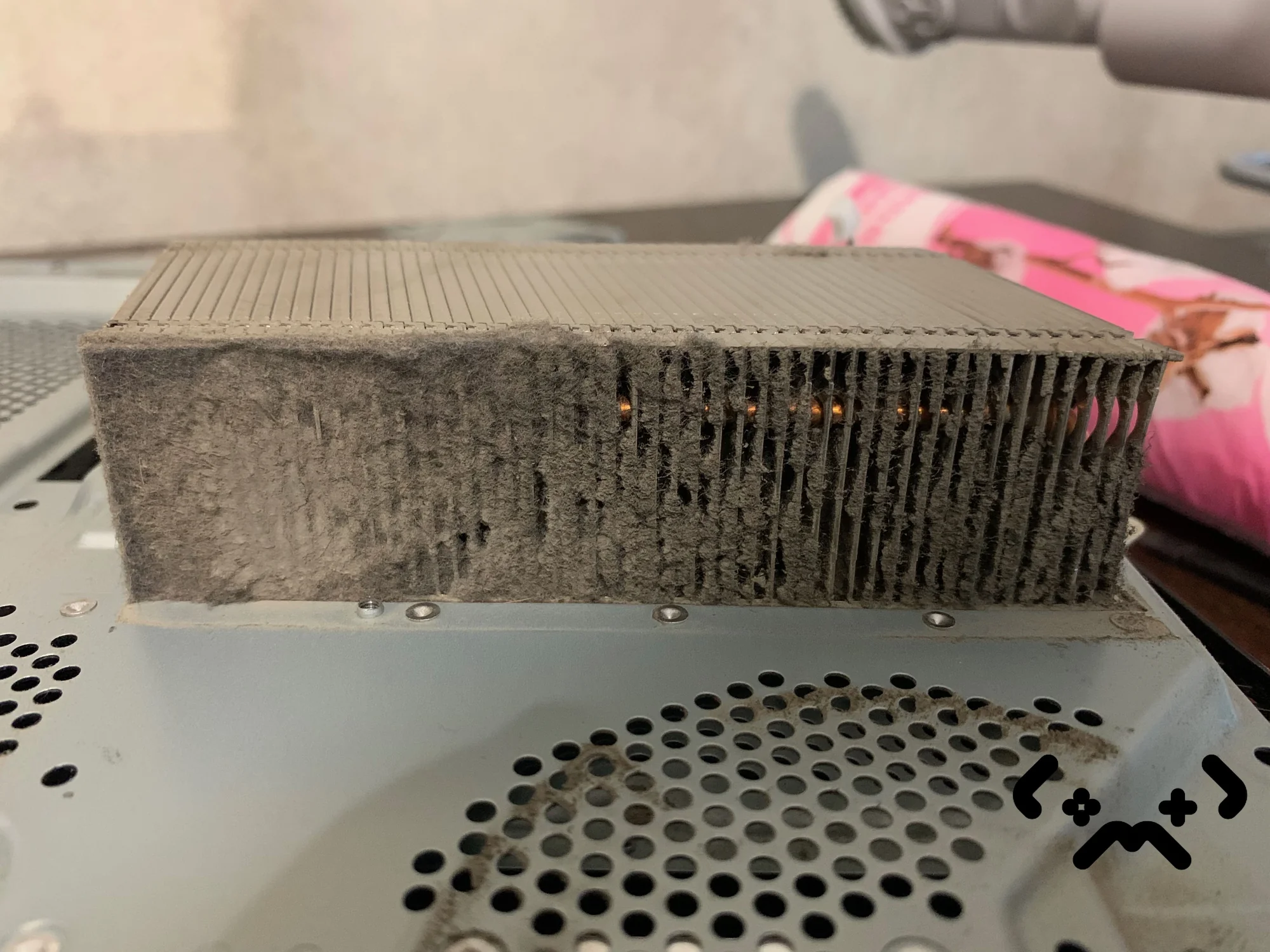
There is no fixed interval for cleaning a PS4. Clean it when dust shows at the vents, when the fan is loud even in the menus, or when the overheating message appears — and if a console this old has never been opened, it is due now. The PlayStation 4 came out in November 2013, so any PS4 still in use has years of dust behind it. Sony's own safety guide says not to let dust build up on the vents. This post is about what happens when it does, and what fixes it.
No calendar rule fits every home: pets, carpet, smoke and a spot near the floor all bring the next clean closer. Most PS4 heat trouble starts in the heatsink fins, where dust packs into a mat. A loud fan in the menus, the overheating message or a pulsing red light means the console is overdue. A real clean lifts the heatsink, and once it is off, fresh thermal paste goes on. Liquid metal is not worth it on a PS4.
PS4 clean in Helsinki from €79 — done at your home: dust out of the heatsink and fan, fresh thermal paste, 90-day warranty.
Book a PS4 clean →Why a PS4 is a special case
A PS4 is a special case because of its age, not its design. It uses ordinary thermal paste rather than liquid metal, and one heatsink with one blower fan. Simple — but after years of use the heatsink fins are usually packed with dust, and nobody has touched the paste since the factory.
There are three families: the original PS4 (CUH-1000, 1100 and 1200), the Slim (CUH-2000 series) and the Pro (CUH-7000 series). iFixit's teardown of the original found a single 85 mm centrifugal fan pushing air through the heatsink. The Slim and the Pro are laid out differently, but the job is the same on all three: getting to the heatsink means taking most of the console apart.
Dust and paste — what builds up inside
Dust builds up in three places — the intake vents, the fan blades and the heatsink fins — and the fins are the one that matters. Air has to pass between thin, closely spaced metal plates. Lint catches on their front edge and grows into a felt mat, like the one in the photo at the top.
- —Intake vents — the part you can see; Sony's guide says not to let dust build up there
- —Fan blades — a coat of dust makes the fan work harder for the same airflow
- —Heatsink fins — the choke point; dust packs on the side where air enters and blocks the way out
- —Thermal paste on the APU — ages with years of heat; rarely the first cause, but renewed whenever the heatsink comes off
The order matters. iFixit's repair team puts a plugged heatsink first among PS4 overheating causes and a failing fan second, and says stock thermal paste is virtually never the cause on its own. Paste still gets replaced on every proper clean, for a mechanical reason: you can't clean the fins properly without lifting the heatsink, and once it is lifted the old layer is broken. iFixit says the same — any time the motherboard comes out, new paste goes in.
Symptoms — what dust and heat actually cause
Dust doesn't break a PS4 in one go. It shows up as noise first, then heat warnings, then shutdowns. The table lists the usual signs and where each one points.
| What you notice | What it usually means | What to do |
|---|---|---|
| Fan loud even in the menus | Heatsink fins clogged; the fan speeds up to move the same heat | Full clean with the heatsink off |
| Overheating message on screen | Internal temperature too high; Sony says turn it off and let it cool | Move it somewhere ventilated; if it comes back, clean |
| Power light pulsing red | Sony lists this as overheating | Same as above |
| Shuts down mid-game with no warning | A real overheat shows a warning first, so this may be something else | Get it diagnosed |
| Rattle, grinding or wobble from the fan | Worn bearing or unbalanced blades | Check the fan spins freely; if not, it needs replacing |
The pulsing red light is on Sony's power indicator page: turn the console off, let it cool, move it somewhere with better airflow and check the vents. A console that shut down mid-game often starts in safe mode next time. The menu can repair the software side — our PS4 safe mode guide goes through the options in order — but no menu option removes dust.
The jet-engine noise
The roar is not a design flaw. The fan speeds up because the console is asking for more cooling, and a heatsink full of dust needs far more airflow to shed the same heat. Fan noise climbs steeply towards the top of its range, so a dusty PS4 doesn't sound a bit louder — it sounds like a different machine. That is a fixable state, not old age.
How often to clean a PS4
Look at the vents every few months, and clean the console properly when the signs above appear; beyond that there is no honest single number. One iFixit guide suggests renewing paste every couple of years, but how fast dust builds up depends far more on the room than on the calendar.
What brings the next clean closer — most of it straight from Sony's safety guide:
- —Pets and long-fibre carpet — Sony says not to place the console on a rug with long fibres
- —A closed cabinet or a cramped shelf — Sony warns heat builds up there, and asks for at least 10 cm from a wall
- —Cigarette smoke — Sony says smoke residue on internal parts can cause malfunctions
- —A spot on or near the floor, where the room's dust travels — iFixit names it as a common reason fins clog
- —Long daily sessions — more hours under load, more air through the heatsink
The fan is loud in the menus, not only in games. The overheating message has appeared, or the power light has pulsed red. The console has shut down during a long session. Any of these means the heatsink should come off now, not at the next convenient moment.
The flip side: a PS4 that runs an hour a week in a clean room doesn't need the same attention as one that runs every evening next to the dog's basket. Hours under load plus dust in the room — that is the whole formula.
Proper clean — what it involves
A proper PS4 clean means the heatsink comes off: dust out of the fins and the fan, old paste off, fresh paste on, and a load test before the console goes back on the shelf. Blowing air through the vents from outside is maintenance, not a clean.
- —Power off and unplug — Sony asks for the power cord out before any cleaning
- —Open the case; on the original PS4 it is held by security Torx screws
- —Take out the power supply, the drive and the board to reach the heatsink — iFixit's guide for the original runs to 32 steps
- —Clear the heatsink fins and the fan blades; check that the fan spins freely and quietly
- —Remove the old paste from the APU and the heatsink base with isopropyl alcohol
- —Apply a thin, even layer of good non-conductive thermal paste
- —Refit the heatsink with even pressure, tightening the screws gradually and crosswise
- —Reassemble and run a game for a long session: no warnings, and the fan stays calm
We do this at your home, at your own table, so the console never leaves the house. If you'd rather bring it to us, that works too. While the console is open, the fan gets checked as well.
DIY or book a technician
A PS4 is a reasonable home job if you have security Torx bits, decent paste, a clear table and a free evening. iFixit rates the original's paste replacement as easy but tedious: nothing is difficult, there is just a lot of it.
Where first-timers go wrong: thin ribbon cables that tear when pulled at an angle, stripped screws, and a heatsink tightened on one side first, which leaves poor contact with the chip and a console that runs hotter than before. And if your PS4 already shuts down under load, a clean fixes the dust but won't tell you whether something else is failing — that part is diagnosis.
If you'd rather not, the PS4 clean is a fixed price — both options are on the price list — with a 90-day warranty, and diagnostics are free.
Loud PS4 or overheating warnings? Clean with fresh paste from €79 at your home in Helsinki, Espoo or Vantaa. Diagnostics are free.
Get in touch →FAQ
Can a PS4 be cleaned without opening it?+
Partly. A vacuum on low power over the vents removes the dust you can see, and it's worth doing every few months. It doesn't reach the fins behind the fan, which is where the mat forms, so on a console that has never been opened it won't make a loud fan quiet.
Vacuum or compressed air?+
Outside, a vacuum on low power. Compressed air blown into the vents pushes part of the dust deeper inside. With the heatsink out, a soft brush and a vacuum do the job; if you use air, hold the fan still so it doesn't overspin.
Which thermal paste should I use on a PS4?+
Any good-quality, non-conductive paste from a known maker. Liquid metal isn't worth it on a PS4: fresh paste does the job, and a spill of an electrically conductive metal can short the board.
Will opening my PS4 void the warranty?+
Sony's guarantee runs for one year from purchase, and the safety guide says unauthorised modification voids it. A PS4 bought new more than a year ago is already outside it.
My PS4 roars but doesn't shut down. Can I leave it?+
You can, but the fan is running near its limit for hours, which wears its bearing, and the console has no margin left for a warm summer day. The cheapest stage to fix is the first one.
Certified laptop and console repair master. Twenty years on the bench in Helsinki — tearing down PS5s, MacBooks, and gaming PCs and writing down what we learn.
+358 45 196 9558 →