A MacBook fan that gets loud under a heavy job is doing its work. A MacBook fan that is loud with a browser and a mail window open, or a MacBook that is hot to type on for no reason, is telling you something — usually about the surface it sits on, a process running in the background, or, on older Intel models, dust and tired thermal paste inside.
Which of those it is depends a lot on which MacBook you have. An Intel MacBook Pro and an M-series MacBook Air overheat in completely different ways, and one of them has no fan at all. Below: how to tell the difference, what Apple itself says to check, and when a proper MacBook cleaning is the fix and when it isn't.
Apple says to use a Mac laptop at 10–35 °C room temperature, on a hard flat surface — on a bed or your lap the fans run more. Open Activity Monitor, sort by % CPU, and look for an app that won't let go. A high kernel_task means the Mac is holding the CPU back because it is hot, not that kernel_task is the problem. Every M-series MacBook Air is fanless: it gets slower under long heavy loads, not louder, and there is no fan to clean. Intel MacBooks — and, after years, M-series Pros — collect dust on the fan and heatsink; that is what a cleaning fixes.
Normal warmth vs an overheating MacBook
Warm under load and a fan that spins up and then settles is normal. A fan that stays loud at idle, a palm rest that is hot with nothing open, or a Mac that gets steadily slower in a long export is not — that is a MacBook overheating or working much harder than the job needs.
Apple's own guidance on keeping a Mac laptop within operating temperatures is short: use it where the room is between 10 and 35 °C, on a stable surface that lets it ventilate, and not in bed, on a pillow or under bedding. If the laptop has fans, they turn on automatically to cool the critical parts — so fan noise by itself is the cooling doing its job. The question is whether it has a reason to.
- —Loud during a video export, a game or a big compile, quiet again afterwards — normal.
- —Loud at idle or with light apps open, and it didn't use to be — something is using the CPU, or the air can't get through.
- —Hot and slow, but silent — you probably have a fanless MacBook Air. See below.
- —Grinding or rattling rather than a rushing-air sound — a mechanical fan noise. Software checks won't change it.
Intel or Apple silicon: why it changes the answer
Check first: Apple menu → About This Mac. If it lists a Chip (M1, M2, M3 and so on), you have Apple silicon; if it lists a Processor made by Intel, you have an Intel Mac. The two behave differently when hot.
Intel MacBook Pros and the Intel MacBook Air all have fans. The chips run hot, the fans spin up often, and after a few years the fan and heatsink fins collect dust. On these machines a loud fan is very often a cooling system that has lost its airflow.
Apple silicon changed the picture. When Apple launched M1 in 2020 it said the MacBook Air now delivers its performance in a fanless design, while the MacBook Pro kept an active cooling system. That split has held: the M-series MacBook Pro has fans, the M-series MacBook Air has none — Apple still describes the 2026 M5 Air as fanless.
| MacBook | Fan | What 'overheating' looks like | Does cleaning help? |
|---|---|---|---|
| Intel MacBook Pro / Intel Air | Yes | Loud fan, hot chassis, slowdowns | Often — dust and old paste are common |
| M-series MacBook Pro | Yes | Fan louder than it used to be under the same work | After years of use, when dust has built up |
| M-series MacBook Air | No | Silent, warm, slower under long heavy loads | No fan to clean — look at the workload |
Fanless MacBook Air: it slows down instead of getting loud
An M-series MacBook Air can't get loud because it has no fan. When it gets hot under a long heavy load, the chip runs slower to stay within its temperature limit. That is how the design works, not a fault.
Short jobs don't reach that point. Long ones can. In a test Macworld reported in March 2024, an M3 MacBook Air running a 20-minute graphics benchmark with the lid closed and two external displays started to slow after about six minutes and ended up losing around half its performance.
So for a fanless Air, 'my MacBook is overheating' usually means one of three things: a job that is simply too long and heavy for a fanless machine, an app running in the background that shouldn't be, or a Mac smothered in a blanket or a sleeve. None of these is fixed by opening it up. A fan-and-heatsink clean has nothing to work on here — no fan pulls air through it, so dust isn't what makes an Air hot.
If your daily work is long renders or builds, that is a reason to use a Mac with a fan for them, not a reason to service the Air.
Quick checks: surface, room and vents
Put the MacBook on a table. Apple's page about fans and fan noise says to use it on a hard, flat surface like a desk, and that on a couch, pillow, bed or your lap its fans might run more. That one change is free and often enough.
- —Hard, flat surface — a desk, not a duvet or a lap.
- —Nothing covering the keyboard or the ventilation openings.
- —Room temperature between 10 and 35 °C: not in direct sun, not next to a radiator.
- —Fans fast with no heavy work, on an Intel Mac: reset the SMC, as Apple's fan page describes.
- —Same on Apple silicon: close and open the lid, or restart the Mac.
Windows laptop instead of a Mac? The physics is the same but the checks are different — see laptop overheating and fan noise.
Activity Monitor: find what keeps the MacBook fan loud
Open Activity Monitor, click the CPU tab, and sort by % CPU. If one app sits near the top while you are doing nothing, that app is what keeps the fan loud and the MacBook warm — quit it and listen.
Activity Monitor is in Applications → Utilities, or type its name into Spotlight. Apple's temperature page points to it for exactly this: when the fans run unexpectedly, check CPU activity first. Typical culprits are a browser tab stuck in a loop, a sync or backup that hasn't finished, or a video call app that stayed open.
One process confuses people: kernel_task. Apple explains that kernel_task helps manage CPU temperature by making the CPU less available to processes that use it intensely, and that you may hear more fan activity while it does. It doesn't cause the heat — it reacts to it. A high kernel_task is the Mac telling you it is hot. Look for the app underneath it, and if there isn't one, the heat is coming from the cooling system itself.
Dust and old thermal paste in Intel MacBooks
If the surface is right and nothing unusual is using the CPU, but an Intel MacBook is still loud and hot, the cause is usually inside: dust on the fan and heatsink fins, and thermal paste that has aged on the chip.
The fan pulls air through the laptop and pushes it across a stack of thin metal fins on the heatsink. Lint and dust collect on the front edge of those fins. As that layer grows, the same heat needs more fan speed to move — which is exactly the loud-at-light-load fan people describe. Blowing canned air into the vents from outside moves part of it around; it doesn't clean the fins.
The second layer is the thermal paste between the processor and the heatsink. Over years of heating and cooling it dries out and conducts heat worse. iFixit's heat sink guide for the 2012 MacBook Pro opens with the question whether 'gobs of OEM thermal paste' are making the MacBook sluggish while hot, and the fix it describes is to clean off the old paste and apply a new layer. That means removing the heatsink — not a job for a spare evening without the right drivers.
M-series MacBook Pros run much cooler than the Intel ones, so they get there more slowly. But they have fans too, and after years of daily use the same dust builds up on their fins. The same goes for a Mac mini, which also has a fan — see Mac mini cleaning.
Intel MacBook loud even on a desk, with nothing in Activity Monitor? Full clean and fresh thermal paste from €89 — at your home or office, free diagnostics, 90-day warranty.
Book a MacBook cleaning →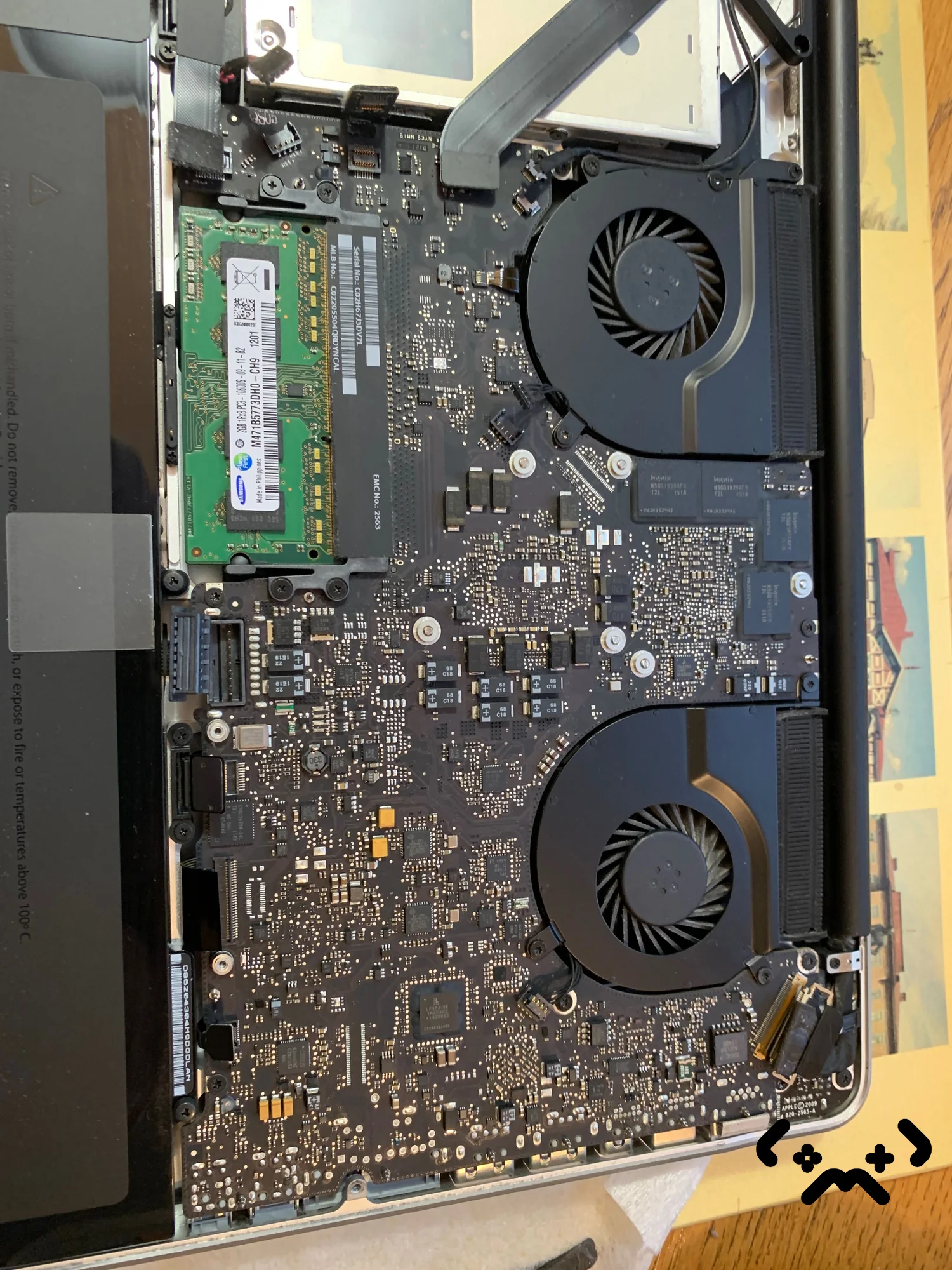
MacBook cleaning: what it involves and when it helps
A MacBook cleaning means the bottom case comes off, the fans and heatsink are cleaned, the old thermal paste is removed and fresh paste goes on. It helps when the heat comes from dust and old paste; it doesn't help a fanless Air, a runaway app or a Mac on a pillow.
At MopsiHuolto the work is done on-site, at your home or office in Helsinki, Espoo, Vantaa or Kerava, and takes about an hour and a half. Before we leave, the MacBook is reassembled and run under a real workload — the fans have to settle and stay settled. The fuller option adds a battery health report, which is worth it on a MacBook that is four years old or more.
- —Worth it: an Intel MacBook Pro or Air that is loud at light load, hot on a desk, with nothing unusual in Activity Monitor.
- —Worth it: an M-series MacBook Pro, several years old, whose fan is clearly louder under the same work than it used to be.
- —Not worth it: an M-series MacBook Air — no fan, no heatsink airflow to clean.
- —Not worth it: a MacBook still under Apple's warranty or AppleCare+. Go to Apple first.
- —Not the fix: a grinding or rattling fan. That is a worn part, not dust.
MacBook fan loud, desk checks done, Activity Monitor clean? Cleaning and fresh thermal paste from €89, on-site in the Helsinki area, 90-day warranty.
Book a MacBook cleaning →FAQ
Why is my MacBook fan so loud?+
Because the Mac is working to get rid of heat: a heavy app, a background process, a soft surface blocking airflow, or — on Intel models and older Pros — dust on the fan and heatsink. Put it on a desk, check Activity Monitor, and if it stays loud at idle, the cooling itself needs attention.
Is it normal for a MacBook to get hot?+
Warm under load, yes. Apple rates Mac laptops for use at 10–35 °C room temperature and says the fans switch on automatically to cool critical parts. Hot at idle, or hot with a fan that won't calm down, is not normal.
Does the MacBook Air have a fan?+
The Intel MacBook Air does. Every M-series MacBook Air, from M1 to M5, is fanless. It doesn't get loud when hot — it slows down under long heavy loads instead.
How do I stop my MacBook from overheating?+
Use it on a hard, flat surface, keep the vents and keyboard uncovered, keep the room under 35 °C, and quit apps that hold the CPU in Activity Monitor. If an Intel MacBook or an older M-series Pro is still hot after that, a cleaning with fresh thermal paste is the next step.
Should I worry if kernel_task uses a lot of CPU?+
Not about kernel_task itself. Apple says it limits CPU access to keep the temperature down and drops back once the CPU cools. Find what is making the Mac hot — an app, the surface, or the cooling system.
Certified laptop and console repair master. Twenty years on the bench in Helsinki — tearing down PS5s, MacBooks, and gaming PCs and writing down what we learn.
+358 45 196 9558 →