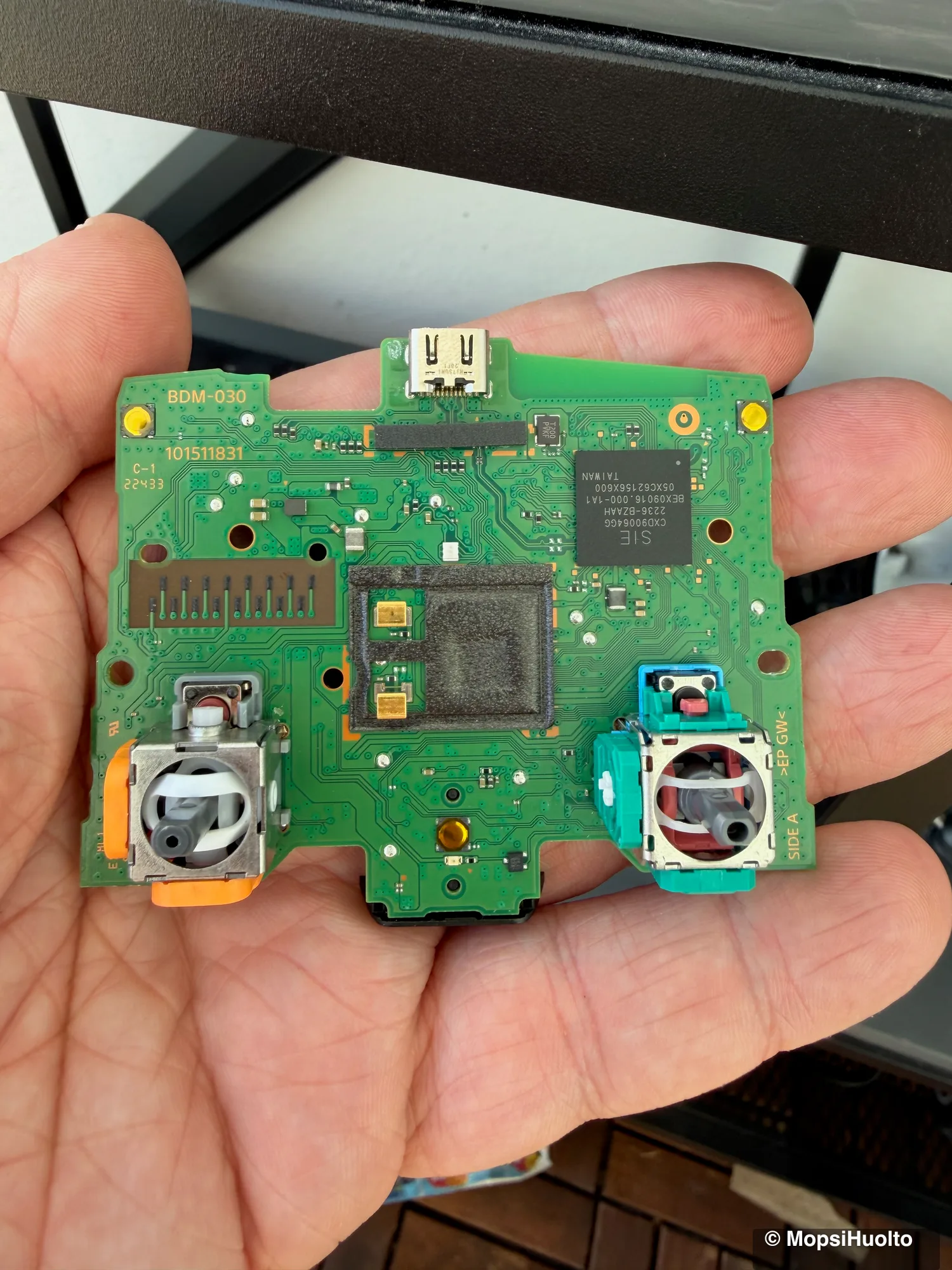
Stick drift is a DualSense reporting movement nobody made: the camera creeps, your character walks off on its own, the cursor slides through menus with your thumbs off the sticks. On a standard DualSense the cause is almost always wear inside the stick module, and wear has one lasting fix — a new module. Calibration and cleaning cost nothing and are worth a try, but they work on the symptom. Below: what is actually worn, what each fix can and can't do, and when the controller is better off in someone else's hands.
Drift on a standard DualSense is almost always mechanical wear inside the stick module. Calibration on a PC resets the stored centre — it helps a small, steady offset and nothing more. Cleaning only helps when dirt is the cause; it can't restore a worn track. The fix that lasts is a new module, and a Hall Effect or TMR module has no track to wear. Under a year old? Contact Sony before you open anything.
DualSense stick drift fixed in Helsinki from €30 — a new Hall Effect / TMR stick module, not a clean of the old one. Fixed price, 90-day warranty. Bring it in or post it.
Book a stick replacement →What's actually broken
Each DualSense stick reads its position with two potentiometers, one per axis: a small metal wiper sliding over a resistive track. iFixit's breakdown of DualSense drift lists four ways that goes wrong. The wiper scrubs the track until the voltage readings shift. The centring spring fatigues and settles at a new neutral point. The plastic parts deform under constant pressure. And dust — including plastic dust from the mechanism itself — gets inside. The first three are wear, and wear doesn't reverse.
That is why drift tends to arrive gradually and get worse: a slight creep in one game first, then a camera that won't sit still anywhere. How fast it happens depends on how much and how hard the stick is used. There is no fixed number of months.
Before fixing anything, make sure it really is drift. Watch the stick in the PS5 menus and in a second game — games use different dead zones, so one can show a drift another hides. For hard numbers, plug the controller into a computer and open our free calibration tool: with your thumbs off, a healthy stick reads at or very near zero. If the values wander on their own, the stick is drifting.
Recalibration — the free first step
Recalibration records a new centre and range for the stick, so it fixes a small, steady offset and nothing else. The PS5 has no calibration menu for a standard DualSense. Sony's troubleshooting page offers a reset with a pin in the small hole on the back, and the console can update the controller's software, but neither recentres a stick.
Calibration happens on a computer over USB, in the same browser tool — the full procedure is in how to calibrate a PS5 controller. If the drift is back within hours of a saved calibration, the track is worn and calibration has done all it can. A bigger in-game dead zone hides drift the same way, and costs you fine aim.
Cleaning — when it helps, and when it can't
Cleaning helps only when dirt is the cause, and on a drifting DualSense it usually isn't — wear is. No solvent puts material back on a worn track or tension back into a tired spring. The same iFixit piece reports some success cleaning potentiometer internals with compressed air, contact cleaner or isopropyl alcohol, and in the same breath warns that without taking the module apart you are mostly displacing dust, not removing it.
So treat a clean as a cheap test, not a repair. A short blast of compressed air around the base of the stick, with the stick pushed to one side, is harmless. If the drift eases for a while and then comes back, you have your answer: the module is worn. Keep WD-40 and other lubricants away from the stick — they are not contact cleaners.
Replacing the stick module
A new stick module is the fix that lasts, because it replaces the worn part instead of working around it. On a standard DualSense the modules are soldered to the main board, so the job means taking the controller apart, desoldering the old module and soldering in the new one. iFixit's replacement guide rates it as needing intermediate soldering skills and calls the desoldering difficult.
What goes in matters as much as the soldering. A like-for-like potentiometer module brings back the same wiper, the same track and the same wear. Hall Effect and TMR modules sense position magnetically: in a Hall Effect stick the wiper is replaced by a magnet and the track by a sensor, so nothing rubs against the sensing element. TMR works on the same contactless principle, with a stronger signal from the sensor. No sensor contact means no sensor wear. The spring and the plastic still age, but the main cause of drift is gone.
- —On a standard DualSense there is no clip-in option: the modules are soldered to the board.
- —The shell hides ribbon cables between its halves — separate them slowly.
- —A new module needs calibrating after fitting: its centre and range differ from the old one's.
- —A PS4 controller is built the same way, with soldered potentiometer sticks, and takes the same fix.
That is how MopsiHuolto fixes drift: the worn module comes out, a Hall Effect or TMR module goes in, and the stick is calibrated before the controller goes back to you.
Sony warranty: the first stop for a young controller
If your DualSense is less than a year old, contact Sony before anything else. Sony's EEA guarantee runs for one year from the original purchase and covers defects in materials and workmanship that cause a failure in normal use. It comes on top of your statutory consumer rights, which may also entitle you to a remedy from the seller.
Don't open the controller first. The same document lets Sony reject a claim where there is evidence of an attempt to open or take the product apart. Past the first year, the choice is between swapping the module yourself, paying someone to do it, or buying a new controller.
When to hand it over
Hand it over if you don't own a soldering iron and some practice with it, if you've already opened the controller and something went wrong, or if you want Hall Effect or TMR sticks fitted and the job done once. For a PS4 controller the same applies — see DualShock 4 stick replacement.
The DualSense Edge is a different case. Its stick modules are designed to be swapped by hand: Sony shows how to replace an Edge stick module with a release lever and no tools. Sony's replacement modules aren't Hall Effect or TMR, though — per iFixit, none of the three big console makers uses either — so a new one starts the same wear from zero.
FAQ
Can stick drift be fixed permanently?+
By replacing the worn module, yes. Calibration and cleaning can make drift go away for a while; a new module removes the cause, and a Hall Effect or TMR module removes the track that wore out in the first place.
Does isopropyl alcohol fix stick drift?+
Only when dirt is the cause. It can't restore a worn track, and dripping it in from outside mostly moves dust around. If the drift comes back after a clean, the module is worn.
Are Hall Effect sticks drift-proof?+
They remove the main cause: the sensor doesn't touch anything, so it can't wear the way a potentiometer track does. The spring and the plastic around it still age, and any electronic part can fail, so "drift-proof" is too strong. "No sensor wear" is accurate.
Should I just buy a new DualSense?+
A new DualSense comes with the same potentiometer sticks, so it starts the same wear from zero. If the controller is otherwise in good shape, swapping in a Hall Effect or TMR module fixes the drift and removes its main cause.
Does the DualSense Edge drift too?+
Yes — its sticks aren't magnetic either, so they wear the same way. The difference is that an Edge module clips out by hand, so a worn one is a swap rather than a soldering job.
Certified laptop and console repair master. Twenty years on the bench in Helsinki — tearing down PS5s, MacBooks, and gaming PCs and writing down what we learn.
+358 45 196 9558 →