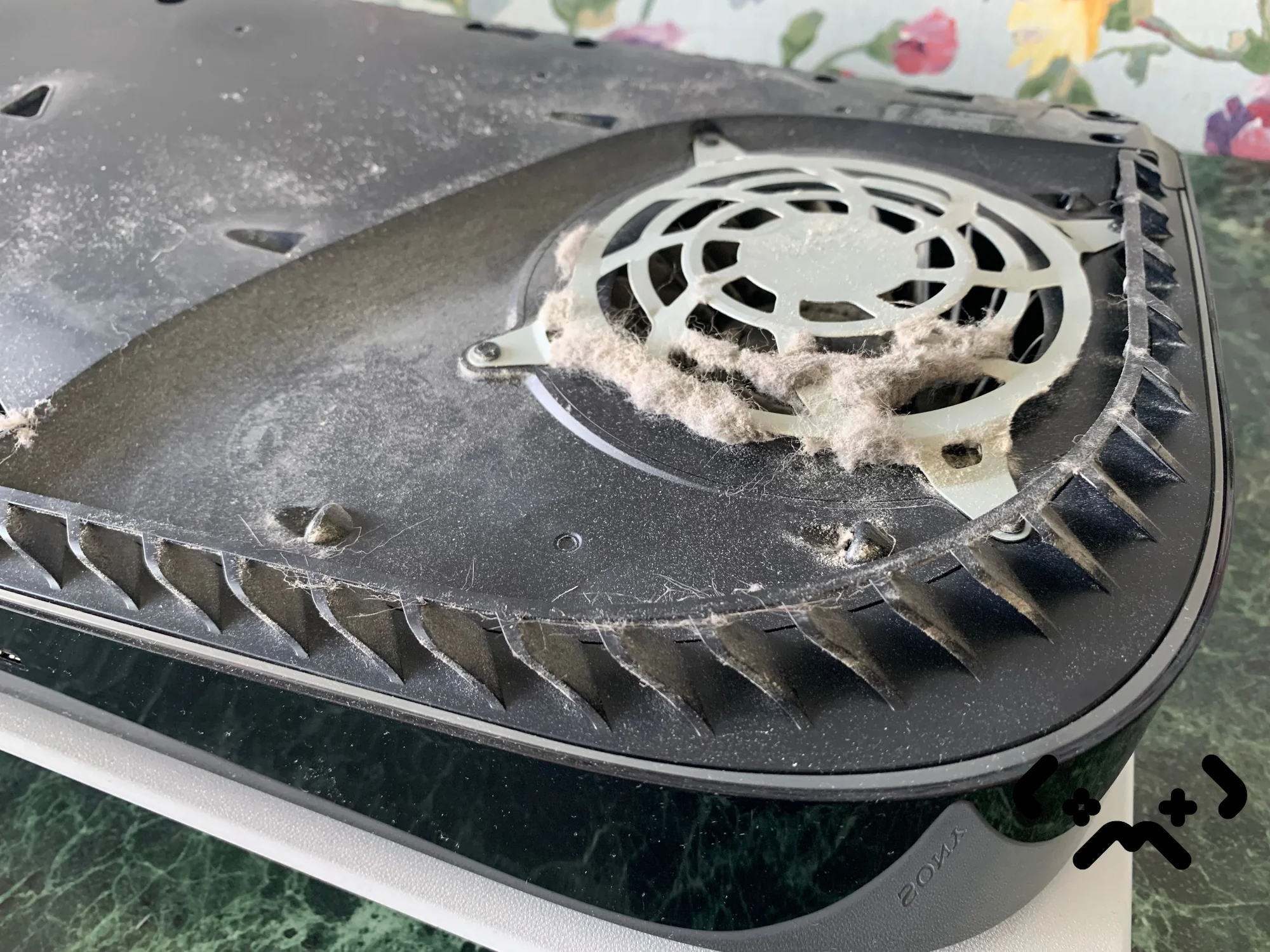
If your PS5 shuts down in the middle of a game with no warning, or you've seen the temperature warning screen and ignored it, this post is for you. The console isn't broken — it's the firmware doing exactly what Sony designed it to do. But every shutdown is also a small bill that the APU is filing for later. Here is what is actually happening under the cover, in plain terms, in the order the events occur.
PS5 running hot or shutting itself down? Fixed price from €89 in Helsinki — full teardown, fresh liquid metal, 90-day warranty.
Book a PS5 clean →What 'PS5 shuts down by itself' actually means
Inside the PS5 sits a single AMD chip — the APU — that combines an eight-core Zen 2 CPU and an RDNA 2 GPU on one die. It is cooled by liquid metal under the heatsink (not regular thermal paste like the PS4), a vapour chamber, and a large axial fan. The firmware reads the die temperature through an on-chip sensor several hundred times per second. The fan curve is tied directly to that reading.
The console doesn't shut down because it has 'broken'. It shuts down because the temperature sensor on the APU has crossed a hard threshold the firmware will not let it pass. That threshold sits well below the temperature at which the silicon would actually fail — the shutdown is the safety margin. What people usually call 'overheating' is the moment when the cooling system can no longer keep up with the heat the APU is generating, and the firmware pulls the plug to prevent silicon damage.
Pattern 1: the console plays for 30–60 minutes, then shuts down without any on-screen warning. This is the firmware tripping the hard limit because the APU sensor crossed the danger line faster than the fan could respond. Pattern 2: the temperature warning screen appears, the user dismisses it and keeps playing, then a shutdown follows minutes later. Pattern 3: instant shutdown the moment the game loads. The third pattern is the worst — it means the APU is hot before any real load is applied, and the liquid metal layer has likely already migrated.
The warning sequence Sony built in
Sony shipped the PS5 with a four-stage thermal response, and most owners only ever notice the last one. Knowing the earlier stages tells you how much warning you actually had.
- —Stage 1 — fan ramps up. The console gets audibly louder during heavier scenes. Most people assume this is normal. On a clean console with healthy liquid metal the fan holds a lot steadier than that.
- —Stage 2 — frame pacing wobbles. Some games show micro-stutters that aren't there on a cooler console. This is the firmware quietly reducing the GPU clock to bring temperature down. You won't see a notification.
- —Stage 3 — temperature warning screen. A full-screen banner asks you to make sure the vents are clear. This is the explicit warning. If you see this, the APU is already within a few degrees of the shutdown threshold.
- —Stage 4 — hard shutdown. The console powers off. The next boot triggers a 'system encountered an error' message. The save in the game is gone unless the title autosaved.
Once you've reached stage 3, you don't get the earlier warnings back — by the next session the console is already running closer to the limit. Stage 4 followed by a clean boot tells us the APU is still healthy and the cooling system is what failed. Stage 4 followed by repeated boot failures or CE-108255-1 errors tells us the APU has already taken thermal damage.
Why your PS5 is overheating now
The PS5 launched in November 2020. Consoles bought at launch are now five and a half years old. The factory liquid metal works perfectly when fresh but isn't immortal: it slowly migrates away from the centre of the APU die, pools at the edge of the foam dam that holds it in place, and leaves dry spots in the middle. The fan can't compensate for a dry spot — the heat path is broken.
On top of that, dust accumulates in three places that all matter: on the intake grille, between the heatsink fins, and on the leading edge of the fan blades. Of these, the heatsink fins are the killer. Once they clog, the airflow over the vapour chamber drops, the chamber can't shed heat into the exhaust, and the APU has nowhere to send its warmth. The console doesn't fail dramatically — it just runs hotter and hotter until the firmware steps in.
| What we find, most common first | What it actually is |
|---|---|
| Dust in heatsink + dry liquid metal | Both effects compound — clean alone won't fix it, paste alone won't fix it |
| Liquid metal pump-out only | Foam dam has degraded, LM has slid off the die. Repaste + new dam. |
| Dust in heatsink only | Console under 3 years old, factory LM still good. Pure clean fixes it. |
| Fan bearing worn | Constant roar even in the menu, RPM no longer drops on idle. Fan replacement. |
| Enclosed cabinet, no airflow | Not a fault — owner needs to move the console. |
| APU already damaged | Stage 4 shutdowns with boot errors. Motherboard replacement (€380+). |
The number to notice in that table is 1%. By the time a PS5 has actually damaged the silicon, it is almost always because the warning signs in stages 1–3 were ignored for many months. The other 99% are reversible with a clean, fresh liquid metal, and a new foam dam — usually in a single bench session.
'My PS5 is in an open shelf — it can't be the airflow'
Open shelves are not the same as good airflow. Three things still cost you: the floor under the console traps heat (especially soft surfaces like carpet); the back panel grille points at a wall or another device; and pet hair settles on the intake from above without you ever noticing. The console doesn't need a tunnel of air around it — it does need at least 10 centimetres of clear space on every side, and nothing pointing exhaust at it.
What you can do at home — and what you can't
There is a sensible at-home check that is worth running before you book anything. It buys you nothing if the liquid metal is already gone, but if the problem is purely dust, it can postpone the bench visit by a few weeks.
- —Power the console off completely and unplug it for at least five minutes
- —Pop the side panel (the white plastic shell — it slides off with a firm pull from one corner, no tools)
- —Look at the exhaust fan and the back grille. If you can see a grey carpet of dust on the fan blades or grille, you are part of the problem
- —Use a soft brush and a low-suction vacuum from outside — never compressed air pointed inwards, that just moves the dust deeper into the heatsink
- —Do not unscrew anything. The heatsink and APU are under the second layer; opening them at home is what destroys the liquid metal layer
If the surface clean buys you another two weeks of quiet play, fine — but the underlying cause hasn't moved. Heatsink dust and liquid metal pump-out aren't accessible from the side panel. They sit under the EMI shield and under the fan, both of which are bonded with thermal interface pads that have to be replaced together with the liquid metal. This is the part that does not work as a DIY job, no matter how confident the YouTube video sounded.
Liquid metal on the PS5 isn't paste — it is a thin film of gallium-based alloy held in place by a foam dam. If you remove the heatsink without knowing what you're doing, the foam dam comes off with it and the liquid metal flows onto the board. Once it touches a capacitor, you've turned a clean job into a motherboard replacement. We see two or three of these every quarter, almost always from owners who watched a single tutorial and went ahead.
The cost of one more month
Every time the PS5 shuts down from overheating, the APU spent the last few minutes above its target operating temperature. That doesn't break it instantly — semiconductors are tougher than that — but it does shorten its life. The mechanism is straightforward: thermal cycles fatigue the BGA solder balls under the chip, and over enough cycles one of them cracks. From the user's side, the symptom is a console that one day simply doesn't post.
We have logged this carefully across two years. A PS5 that goes through one or two overheat shutdowns and is then cleaned has essentially no measurable life shortening. A PS5 that lives through 50+ shutdowns before cleaning has a measurable risk of an APU failure within 12–18 months. A PS5 that has been shutting down weekly for half a year is the one we sometimes can't save with a clean — by that point the silicon damage is done.
In plain money: a PS5 clean with fresh liquid metal and a new foam dam costs €89 with a 90-day warranty on the work. A motherboard replacement after APU thermal death starts at €380 for a used board plus labour, takes two to three weeks while the donor board ships, and carries the inherent risk that the donor was also a tired board. The price difference is about four times. The time difference is about ten times. The risk difference is much larger than that.
What a real PS5 clean is — and isn't
A 'PS5 clean' that takes 15 minutes and €30 is not a real PS5 clean. The console has to come fully apart — side panels, EMI shield, fan, motherboard out of the chassis, heatsink off the APU. The old liquid metal has to come off both the die and the cold plate, the foam dam has to be inspected and replaced, fresh liquid metal applied in the right volume (this is a calibrated amount, not 'a drop'), and the heatsink torqued back down evenly so the cold plate sits flat. Then a stress test for 30+ minutes monitoring exhaust temperature and fan RPM to confirm the fix held.
- —Total bench time: 90–120 minutes on a clean teardown, longer if the foam dam is fully gone
- —Liquid metal used: about 0.4–0.6 grams of Conductonaut or equivalent, applied with a syringe
- —Foam dam: replaced as standard, not optional — the old one is always degraded by year three
- —Fan: cleaned, blades checked for bearing rumble, replaced if the bearing is past 0.3mm play
- —Stress test: a real game (we use Returnal or Cyberpunk at high settings), not a 5-minute menu loop
- —Warranty: 90 days on the work, EU statutory 2 years on any new parts
The price for that is €89 at our bench in Helsinki, parts and labour included. If during the clean we find a worn fan or a damaged foam dam beyond the standard replacement, we quote that separately and we don't start the extra work without a confirmation. Diagnostics are free. If your PS5 isn't economical to repair after assessment, you owe nothing.
FAQ
Can I just buy thermal paste and replace the liquid metal myself?+
Technically yes, practically no. Replacing liquid metal isn't comparable to replacing paste — there's a foam dam to manage, a calibrated amount of LM to apply, and a torque sequence on the heatsink that has to be even. If any of those three are wrong, the console runs worse than before the clean. We see one or two DIY attempts every month that arrived at the bench in a worse state than they started in.
How many shutdowns can a PS5 survive before damage?+
There is no exact number, and anyone who gives you one is inventing it. A handful of shutdowns leaves no lasting harm. What matters is not the count but the duration — a console that hit its limit and cut power quickly is fine; a console that ran at the limit for ten minutes before giving up did more damage in that one cycle than a dozen clean shutdowns. The pattern on the bench is simple: the consoles that come back dead are the ones that were played through months of shutdowns.
Will a PS5 Pro overheat the same way?+
The Pro has the same liquid metal architecture as the original PS5, just a larger heatsink and a higher heat output. The failure modes are identical — dust in the heatsink, liquid metal pump-out, foam dam degradation. The cleaning schedule is the same: once a year minimum, every 8–10 months if the console is in a household with pets or carpet.
What if the console shuts down and then won't turn back on at all?+
That's the situation where we recommend bringing it in immediately rather than after the weekend. A console that boots once and then shuts down is in stage 4 — still saveable with a full clean. A console that won't boot at all has a higher chance of APU damage, and the longer it sits the harder it is to tell whether the issue is repairable. Free diagnostics, no obligation — we look at it and tell you straight.
Does Sony still service the PS5 for overheating?+
Sony's official EU repair flow exists, but for an out-of-warranty PS5 (which is anything older than 24 months from purchase in Finland) it is a flat-fee 'refresh' where the console is essentially replaced, and you lose your original unit. The flat fee is typically €170–€220 depending on model. A workshop clean is €89 and you keep your own console, save data and all. Sony's flow makes sense for under-warranty units only.
How do I know if it is overheating versus a software issue?+
Overheating shutdowns happen during a game, not during the menu, and they happen later in the session as the console heats up. A software issue (rare on PS5) typically reproduces the same way every time — same game, same scene, often within the first few minutes. If the shutdown is also accompanied by audibly louder fan noise in the hour leading up to it, it's thermal.
Certified laptop and console repair master. Twenty years on the bench in Helsinki — tearing down PS5s, MacBooks, and gaming PCs and writing down what we learn.
+358 45 196 9558 →