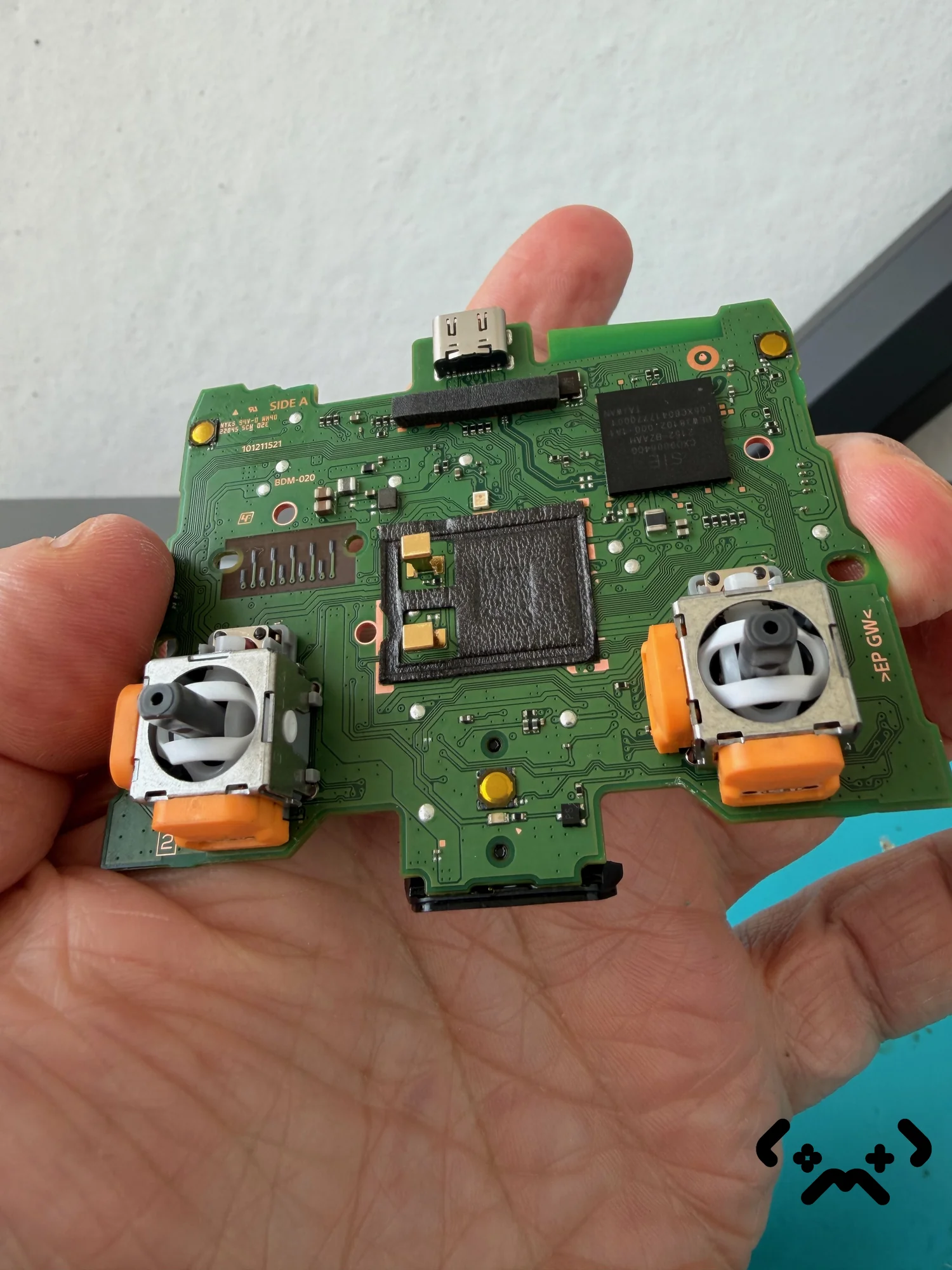
When a PS5 controller stops charging, the battery is rarely the first thing to check. Work through the cheap causes first: the cable, what it's plugged into, the console's rest-mode setting and the temperature of the room. Only when all of those check out does the controller itself — its USB-C port or its battery — become the suspect. Everything below costs nothing until the last two steps.
Try a second cable that carries data — Sony says charge-only cables won't work. In rest mode, the PS5 charges controllers only if Supply Power to USB Ports is set to Always or 3 Hours. Charge between 10 °C and 30 °C; outside that range charging may not be effective. A controller that charges only at one cable angle has a damaged USB-C port, which is a board-level repair. A battery that runs down fast is ageing; a replacement should match 3.65 V, 1,560 mAh.
We fix DualSense stick drift; charging-port and battery repairs we don't do. Tell us what your controller is doing and we'll say honestly where it should go.
Ask us →Cable first — the cheapest suspect
Start with a different cable: it is the cheapest thing to rule out, and a common culprit. Sony's DualSense support page is specific about it: use a cable sold as charge and sync, or charging and data — cables marked charge only cannot be used. The USB cable that came with the console is a good reference.
Cables wear at the ends, where they bend. One that works at some angles and not others, or charges a phone but not the controller, has done its job. Swap it before you suspect anything else.
Power source and rest mode
If a good cable doesn't help, check what it's plugged into. The DualSense takes 5 V at up to 1.5 A, according to its instruction manual, and the PS5's own USB ports are the reference source. Sony allows a charger that complies with the USB standard, but notes that not every USB charger can charge the DualSense — so if a wall charger fails, try the console before blaming the controller.
The other common trap is rest mode. The PS5 only powers its USB ports in rest mode if you let it: go to Settings → System → Power Saving → Features Available in Rest Mode and set Supply Power to USB Ports to Always or 3 Hours. Newer CFI-2000 consoles also offer Adaptive.
Temperature matters too. The manual says to charge between 10 °C and 30 °C and warns that charging may not be as effective outside that range. A controller that spent the afternoon in a car in January should warm up to room temperature first.
Reset and update the controller
If it still won't charge from a known-good cable on the console, reset the controller. Sony's steps: unplug the cable, press the button inside the small hole next to the Sony logo on the back with a pin for at least five seconds, then connect the controller with the USB cable and press the PS button.
Once it's connected, check its device software under Settings → Accessories → Controller (General) → DualSense Wireless Controller Device Software. Neither step touches the hardware. They rule out the controller's software before you start suspecting its parts.
USB-C port damage
A controller that charges only when the cable is held at a certain angle, or whose plug feels loose in the socket, most likely has a damaged USB-C port. The port is soldered straight onto the main board — it's the part at the top of the photo above — so a drop or a sideways tug on the cable can crack its solder joints or bend its contacts.
That is board-level soldering, not a battery job, and the battery may be perfectly fine. MopsiHuolto doesn't do charging-port or battery repairs on controllers; a shop that does micro-soldering is the right place. If the controller is also drifting, that part we do fix — see our stick drift guide and DualSense stick replacement.
Battery age and storage
Like any lithium-ion battery, the one in the DualSense slowly loses capacity with use and age. Sony's manual says so plainly: charge duration gradually decreases with repeated use and age, and depends on storage, usage and environment. An ageing battery shows up as shorter sessions between charges, not as a controller that refuses to charge at all.
Storage is the other half. The manual recommends fully charging a controller at least once a year if it isn't being used. One that sat drained in a drawer for a long time and now won't take a charge from any cable or port may need a new battery.
| Symptom | Most likely cause | What to do |
|---|---|---|
| Charges with one cable, not another | Worn or charge-only cable | Use a charge-and-sync cable |
| Charges while the PS5 is on, not in rest mode | USB power switched off in rest mode | Set Supply Power to USB Ports to Always or 3 Hours |
| Charges from the PS5, not from a wall charger | That charger can't charge the DualSense | Charge from the console or another USB-standard charger |
| Charges only at one cable angle | Damaged USB-C port | Board-level repair shop |
| Charges, but runs down much faster than it used to | Battery capacity lost with age | Battery replacement |
| Nothing from any cable or port, at room temperature | Port, battery or charging circuit | Sony if under a year old, otherwise a board-level repair shop |
Replacement battery: match the original
If you replace the battery, match the original: a lithium-ion cell rated 3.65 V and 1,560 mAh, the figures in Sony's manual. CFI-ZCT1W, often quoted in listings, is the controller's model number, not the battery's.
Cells sold as DualSense replacements vary in quality. Buy from a seller that states voltage and capacity plainly, and treat lithium-ion with respect: the manual warns never to open, crush, heat or burn the battery, and not to handle a damaged or leaking one. If the controller is still inside its first year, Sony's guarantee is the better route — opening it can cost you that claim.
FAQ
How do I know the DualSense is actually charging?+
With the PS5 on, press the PS button, open Accessories in the Control Center and look at the battery icon: it animates while charging, and when the controller is full it stops and shows three bars. In rest mode, the light bar slowly blinks orange while charging and turns off when charging is complete.
Can I charge a PS5 controller with a phone or laptop charger?+
Often, yes. Sony allows a charger that complies with the USB standard, but notes that not all USB chargers can charge the DualSense. If one doesn't work, try the console's USB port or a different charger before suspecting the controller.
Can I leave the controller plugged in all the time?+
Sony's manual advises against leaving the battery charging for a prolonged period when the controller isn't in use. Charge it, unplug it, and top it up when it needs it.
I replaced the battery and it still won't charge. What now?+
Then the fault is most likely the USB-C port or the charging circuit on the main board. Both are micro-soldering repairs: take it to a shop that does board-level work, and weigh the quote against the price of a new controller.
Certified laptop and console repair master. Twenty years on the bench in Helsinki — tearing down PS5s, MacBooks, and gaming PCs and writing down what we learn.
+358 45 196 9558 →